
Powerwall 3 is built for stronger single-unit backup planning than older battery assumptions.
We deliver more
Tesla Certified Installer
Tesla Powerwall 3: Your Home Battery Backup Solution.
Since 2008, PWRHUBUSA has helped homeowners gain more confidence in outage protection, solar storage, and long-term home energy performance with Tesla Powerwall 3 planning. Start with Powerwall 3 cost, Powerwall 3 capacity, and Powerwall 3 installation if you want the main buying questions answered first.
Buy Tesla Powerwall 3 for a battery path built around backup value, real household loads, and a clearer move from first conversation to exact quote. Homeowners comparing runtime usually also need what Powerwall 3 can run and whether a Powerwall 3 expansion pack makes sense.
Serving Utah • Arizona • Texas
Call 855-438-7971 (855-GETPWR1) to confirm current availability, service-area fit, and installation timing.
Benefits
Why homeowners are buying Tesla Powerwall 3.
The decision usually comes down to backup value, solar storage, and whether the system actually fits the loads that matter in the home.
Store more daytime production and use it when rates climb or the grid goes down.
Bring charging, reserve settings, and panel capacity into the same battery design from day one.
Clean installation planning matters just as much as the battery hardware.
What to know first
Powerwall 3 is strongest when it is planned around the home.
Benefit
Back up the circuits that matter most first, then plan for broader home coverage if needed.
Benefit
Pair Powerwall 3 with existing solar or plan storage and solar together in one project.
Benefit
Use the Tesla app to monitor reserve, stored energy, and outage behavior.
Benefit
Prepare for outage resilience, evening load control, and future home electrification.
Benefit
Confirm fit for HVAC, refrigeration, internet, lighting, medical devices, and garage access.
Benefit
Call for current availability and installation timing in Utah, Arizona, and Texas.
Powerwall 3 specs
Translate the spec sheet into real backup performance.
Homeowners do not buy a battery for the numbers alone. They buy it for outage readiness, solar storage value, and the confidence that the system fits the loads they care about most. The spec questions usually start with Powerwall 3 dimensions, Powerwall 3 app, and Powerwall 3 datasheet before the project moves into exact scope.
Energy capacity
13.5 kWh usable storage
Output power
11.5 kW continuous power
Backup design
Built for stronger whole-home backup planning
Solar integration
Integrated inverter path for flexible solar-plus-storage planning
Monitoring
Tesla app visibility for charging, reserve, and outage behavior
Expansion
Scales into multi-battery planning for larger homes and heavier loads
Installation
How the Powerwall 3 project usually comes together.
A strong battery project moves from load review into sizing, installation prep, and a clean activation process without leaving the homeowner guessing.
1
Review the home
Start with service area, outage goals, existing solar, and the loads the homeowner wants protected.
2
Size the system
Match battery count and reserve strategy to critical circuits, bigger appliances, and EV charging plans.
3
Prepare the install
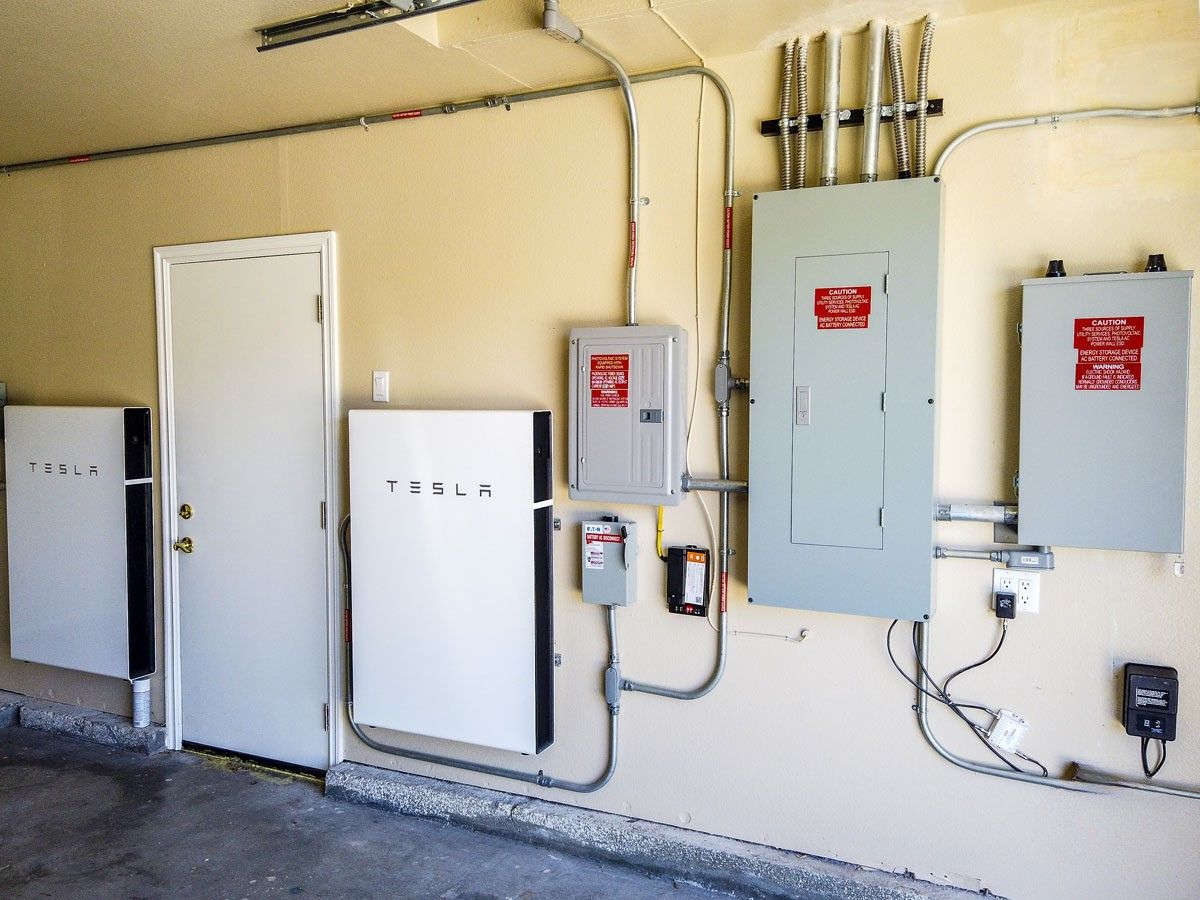
Confirm electrical scope, equipment placement, conduit path, and the timeline for permitting and install.
4
Activate and monitor
Commission the system, verify app monitoring, and make sure the home is ready for the first outage event.
Buyer guide
Have questions about solar battery storage?
Download the Battery Buyer's Guide to understand pricing, backup strategy, battery comparisons, and what to ask before you move forward with Tesla Powerwall 3.
- Compare battery sizing options before you request pricing
- Understand what changes the quote from one home to the next
- Know what Powerwall 3 can run during an outage
- Learn how solar, storage, and EV charging fit together
Learn more
Explore the full battery library.
Our guides, articles, and posts help you move from first questions into a real planning discussion.

Cost guide • 2026-05-08
Powerwall 3 Cost
See the direct cost answer first, then learn what changes price from one home to the next.

Specs guide • 2026-05-02
Powerwall 3 Capacity
Use the 13.5 kWh capacity question to frame runtime, supported loads, and battery count.

Installation guide • 2026-04-25
Powerwall 3 Installation
Move from product interest into installation timing, site review, and commissioning basics.
FAQ
Tesla Powerwall 3 questions homeowners ask before they buy.
These are the core battery questions most homeowners want answered before they commit to pricing and installation.
Can Tesla Powerwall 3 back up an entire house?
Sometimes, but the answer depends on the home, the loads involved, and whether the goal is essential-load backup or broader whole-home coverage.
Do I need solar to buy Powerwall 3?
Not always. A battery can improve outage protection on its own, while solar plus storage gives homeowners more daily control over when energy is used.
What should I have ready before requesting a quote?
Have your ZIP code, state, outage priorities, current solar status, and the major loads that matter most, especially HVAC, refrigeration, medical devices, and EV charging.
Why do I need to talk with someone before pricing is final?
Because battery fit, electrical scope, service-area coverage, and installation timing should be confirmed before the project feels like a standard online checkout.
Service areas
Explore the top markets.
PWRHUBUSA help homeowners in Utah, Arizona, and Texas plan for Powerwall 3. Review the top city markets below.

Testimonials
What homeowners are saying about PWRHUBUSA.
Real outcomes from homeowners who prioritized backup resilience, solar storage value, and electrical planning quality.
Salt Lake City, UT
"16 hours of backup during the winter storm."
"We needed a system that could handle our HVAC and refrigeration without fail. Marcus and the team scoped a two-battery Powerwall 3 setup that kept us fully powered during the February outage while the rest of the block was dark."
— David H., Homeowner
Phoenix, AZ
"Zeroed out our evening peak rates."
"The goal was utility-bill control during the summer. PWRHUBUSA mapped our cooling loads and set up our reserve strategy so we never pull from the grid during 4 PM–9 PM. The Tesla app visibility is incredible."
— Sarah M., Homeowner
Houston, TX
"EV charging and backup in one design."
"Most installers just wanted to sell me a battery. Elena's team actually looked at my panel and my daily driving habits. We integrated the EV-ready upgrade with the Powerwall 3, and it's been seamless."
— Michael R., Homeowner